

Give each option its own chance

Weighted Random PickerSet the balance. Make a choice.

Enter an option and a weight for each row. Preview the probabilities, draw one result, and repeat with the same chances whenever you need another choice.

Relative weights · Zero means excluded · No account

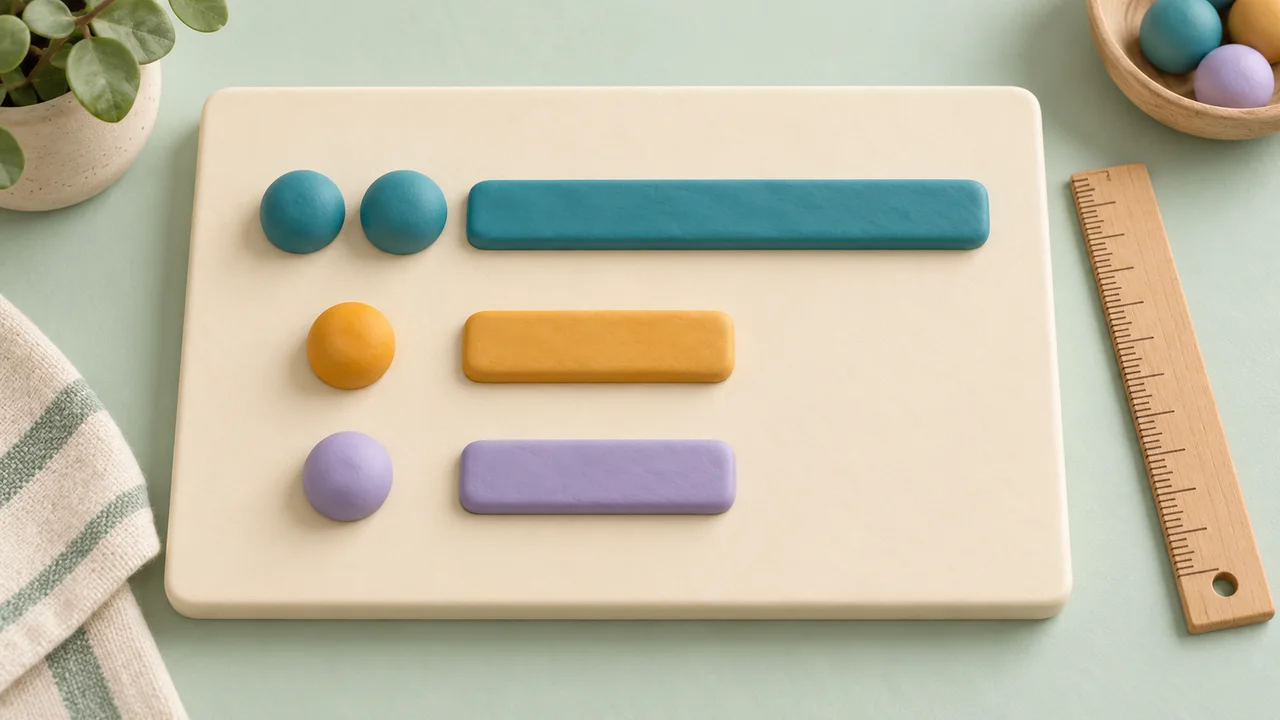
Three clay spheres with vertical probability bars, the teal bar twice as tall as the other two

What are the options and weights?

The 2:1:1 sample gives the first option a 50% chance and the other two 25% each.

Paste options in bulk

Example: Reading | 2. Separate the label and weight with a pipe, tab or final comma; no separator means weight 1. Blank lines are ignored. Up to 40,000 characters. Import replaces options and clears old results.

Options and weights

Up to 200 options. Weights: 0–1,000,000,000,000, at most 6 decimal places. Use a decimal point, no % sign or commas.

Entry 1
Entry 2
Entry 3

Matching labels stay separate. Editing options or weights clears previous results and counts.

How the probability is calculated

Chance = option weight ÷ total weight. With 2, 1, 1: the first option has 2 ÷ 4 = 50%, and the other two each have 25%.

Probability on the next draw

Percentages are rounded for display. Every positive weight participates; zero is excluded.

  • Reading (Entry 1)50%

    Weight: 2

  • Drawing (Entry 2)25%

    Weight: 1

  • Walking (Entry 3)25%

    Weight: 1

With replacement: each draw uses the same weights, so consecutive repeats are possible.

The 2:1:1 example is ready.

Selected option

The selected option will appear here.

Draws this session (0)

Counts cover this entire session. The ordered history and its copy keep only the latest 100 draws. Frequency is not a promised probability.

    Options, weights and results stay in this page. They are not uploaded or saved locally. Copy anything you want to keep before leaving.

    Different weights, visible probabilities

    Choose a ratio that matches the activity you have in mind.

    A weight is a share of the total

    A weighted random picker chooses among options whose chances do not have to be equal. Each option’s probability is its own weight divided by the sum of all weights. A weight of two therefore gives twice the chance of a weight of one, but it does not automatically mean two percent. The probability preview recalculates whenever you edit the options, so you can check the actual distribution before making a choice.

    A teaching board with two teal balls, one amber ball and one lavender ball beside bars in a two-to-one-to-one ratio

    Repeat a draw without changing the odds

    Every draw here uses replacement: the selected entry stays available with the same weight for the next draw. Repeated results are normal, including consecutive appearances of the same option. The history shows your latest one hundred draws, while session counts include all draws since the last reset or edit. Compare those observed frequencies with the theoretical probability, without expecting a small sample to match the ratio exactly.

    Colored balls in a glass bowl beside a scoop and a notebook recording an irregular sequence of colored marks

    How to make a weighted random choice

    Set the inputs, check the percentages, then draw.

    1. 01

      Add clear option labels

      Start with the sample or clear the list and add your own rows. Each row needs a label and a weight. Use short labels that you will recognize in the result, such as Reading, Drawing, and Walking. Up to two hundred options are supported, with one hundred twenty characters per label. Repeated labels are kept as separate entries with their own identifiers; remove accidental duplicates because they add another share to that label’s overall chance. For bulk entry, expand Paste options in bulk and use one row such as Reading | 2 per line. A pipe, tab, or final comma separates the weight; a line without a separator receives weight one.

    2. 02

      Enter relative weights

      Use nonnegative numbers, including decimals with up to six fractional places. Each weight may be as large as 1,000,000,000,000. Scientific notation is accepted when its value stays within those limits. Use a period for decimals and omit percent signs and thousands separators. At least one weight must be positive. A zero-weight row stays visible but is excluded; a negative, blank, nonnumeric, infinite, or out-of-range value prevents drawing and identifies the row to fix.

    3. 03

      Check and use the result

      Read the probability preview before pressing Pick one option. The result includes the chosen entry number and its probability for that configuration. Copy the current result or the recent history. Reset draw history starts a fresh observation without changing any weights. Editing, removing, adding, or importing options clears the old result, history, and counts because they belong to the previous configuration. Keep any record you need before making those changes.

    Simple controls, explicit rules

    The displayed chances and the draw use the same input weights.

    Equal or unequal chances

    Set every positive weight to the same value for an equal-probability draw. Increase one weight to increase that option’s share relative to the others. The original units do not matter: 2, 1, 1 and 20, 10, 10 describe the same distribution. Choose ratios you can explain to the people taking part.

    Zero stays out of the draw

    Use zero to keep an option on the list while temporarily making it unavailable. Zero is not treated as a missing value and never becomes a default weight of one. If every weight is zero, there is no probability distribution to draw from, so you must give at least one option a positive value.

    Probabilities and observed frequencies

    The probability preview describes the next draw. The session summary describes draws that have already happened. A fifty-percent option can appear several times in succession or miss several turns. The picker does not adjust future weights to compensate for earlier results, and it does not promise a quota over a fixed number of draws.

    Work through the probability calculation

    Weight divided by total weight gives the chance of one draw.

    1. 01

      Three options with weights 2, 1, and 1

      Suppose Reading has weight two, Drawing has weight one, and Walking has weight one. The total is four. Reading has 2/4 = 50%, while Drawing and Walking each have 1/4 = 25%. One possible sequence is Reading, Reading, Walking, Drawing, Reading. That short sequence contains three Reading results out of five; it does not mean Reading’s configured probability changed to sixty percent.

    2. 02

      Adding or excluding an option changes the denominator

      If you add Music with weight four, the total becomes eight. Reading drops to 2/8 = 25%, Drawing and Walking each become 12.5%, and Music has 50%. Reading’s own weight stayed two, but its share changed because the total grew. If Music is then set to zero, the original 50%, 25%, 25% distribution returns, and Music is excluded. All edits clear the previous session counts.

    Choose weights for a clear purpose

    Useful for activities and simple probability experiments.

    1. 01

      Activity preferences without a fixed schedule

      You can give a preferred activity more weight while leaving alternatives possible. For example, use a larger value for a reading prompt you want to revisit more often and smaller values for optional prompts. A weighted choice is still uncertain. If an activity must happen a specific number of times, build a schedule instead; increasing its weight cannot guarantee that requirement in a small number of draws.

    2. 02

      Compare a prediction with a short experiment

      Before drawing, write down the probabilities you expect from the weights. Make several independent draws and compare the observed counts with your prediction. Use Reset draw history to begin a new trial with the same setup. Copy the recent history before leaving; only the latest one hundred individual results are retained, although the frequency counters continue to cover the full current session.

    3. 03

      Use another tool for another kind of result

      Random Name Picker suits equal-probability selection from a list. List Randomizer gives every entry a position in a shuffled order. This weighted picker returns one option per click with replacement. It does not manage prize inventories, remove winners automatically, create a weighted schedule, or provide an audited drawing record. Your options and results remain in the active page rather than being saved to an account.

    Weighted picking questions

    Understand the numbers before relying on a result.

    How are weighted probabilities calculated?

    Divide an option’s weight by the total of all weights. Multiply that fraction by one hundred to express it as a percentage. For weights 2, 1, and 1, the total is four and the probabilities are 50%, 25%, and 25%. The preview shows these normalized chances before you draw.

    Does a weight of 2 mean a 2% chance?

    No. It means twice the chance of an option weighted one in the same configuration. The percentage depends on the total. With weights two and one alone, the first chance is about 66.666667%. With weights two and ninety-eight, it is exactly two percent. Check the probability column instead of interpreting weights as standalone percentages.

    Can I use zero, negative, or decimal weights?

    Zero excludes an option, and decimals are accepted to six fractional places. Negative numbers, missing values, NaN, and Infinity are rejected. All-zero configurations also fail because no option has a positive chance. Values outside the displayed limits produce an error rather than being rounded or silently changed into a different weight.

    Why can the same option be selected repeatedly?

    This tool draws with replacement. The selected entry stays in the pool, so every new draw uses the same probabilities until you edit the configuration. Repetition is part of that rule. There is no automatic winner removal or memory-based correction that lowers a recently selected option’s weight.

    Why does the observed frequency differ from the probability?

    Probability describes the rule for each draw, while frequency describes your finite sample. A small sample can deviate substantially, even when every draw follows the correct weights. More observations often make the comparison more informative, but they do not guarantee an exact ratio. Resetting counts starts a new observation; it does not change the probabilities.

    Do weights have to add up to 100?

    No. Any valid positive total works. Weights 5 and 15 have the same chances as 25 and 75. You can enter desired percentage numbers without the percent sign, provided their relative proportions are correct. Displayed percentages are rounded, so the visible total may differ slightly from one hundred even though the underlying probabilities sum correctly.

    How are tiny probabilities and duplicate labels handled?

    Every row is an independent entry. Matching labels are not merged, so their weights contribute separately. Very small positive probabilities are shown as less than 0.000001%, rather than a misleading zero. Near certainty is similarly distinguished from exactly 100%. These display limits do not remove a positive-weight option from the draw.

    Are my options saved or uploaded?

    The weighted picker calculates and draws in your browser. It does not upload option labels, weights, results, or history, and it does not save this configuration locally. Refreshing, closing, or leaving the page discards the session. Copy your current result or recent history before leaving. Site page analytics are separate and do not include these tool inputs.

    Weighted Random Picker

    Make the next choice with clear odds

    Enter the options and the relative chance you want each one to have.

    Check the preview, draw one result, and copy what you need.

    • Free to use
    • No signup
    • Runs in your browser

    A simple path to your next activity

    1. List the options

      Give every choice a clear label.

    2. Set the balance

      Enter weights and review the probabilities.

    3. Make a draw

      Select one option and copy the result.

    Each draw uses replacement. Weights do not guarantee a short-term quota.